How Many Cold Emails Per Day Can You Safely Send Per Inbox?
· 6 min read

"How many cold emails per day can I send from one inbox?" is the question every outbound team asks, and the honest answer is that there is no universal number. Anyone who gives you one figure for every mailbox is guessing. What exists instead is a set of hard limits published by the mailbox provider, and a softer ceiling set by your own sending reputation. This guide separates the two, explains what moves the ceiling, and gives you a conservative way to ramp up.
Hard limits versus the number that is safe
There are two different ceilings, and mixing them up is where most trouble starts.
The first is the provider's sending limit: the most a mailbox is allowed to send. It is a published, fixed number. Google documents its limits on the Gmail sending limits in Google Workspace page. As indexed at the time of writing, it lists 2,000 messages per day per user account, 1,500 for mail merge, and 500 for trial accounts, with caps on total and external recipients per day as well. Google may change these figures, so check the live page before you plan around them. Microsoft 365 publishes its own recipient limits in its Exchange Online documentation.
The second is the safe volume for your domain: how much mail the receiving providers will accept from you without turning suspicious. This number is not published anywhere, because it depends on your reputation. It is almost always far below the provider's hard limit. A new mailbox that technically can send 2,000 messages a day will usually get into trouble long before it gets there.
So treat the published limit as a ceiling you must never touch, not a target.
What actually decides your safe volume
Receiving providers do not look at a single number. They weigh signals over time, and your safe daily volume rises or falls with them.
- Domain and mailbox age. A brand-new domain has no sending history. Mail from it is treated more cautiously than mail from a domain that has sent steadily for months.
- Warmup history. Gradual, consistent volume with real engagement builds a track record. A sudden jump from zero to hundreds looks like what spammers do.
- Authentication. Without SPF, DKIM and DMARC your volume is irrelevant, because providers will not trust the sender in the first place. Our guide to SPF, DKIM and DMARC in plain English covers the basics.
- Complaints and bounces. Google's email sender guidelines ask senders to keep the user-reported spam rate below 0.1% and never reach 0.3%. A higher volume gives you more chances to cross those lines.
- Engagement. Replies, opens and messages moved out of spam teach providers that people want your mail. Mail nobody touches teaches the opposite.
- List quality. Sending to invalid or irrelevant addresses produces bounces and complaints, whatever your volume.
Notice what is missing from the list: a rule such as "50 a day is always fine." Volume is a consequence of reputation, not a setting you pick first.
Why one busy inbox is riskier than several steady ones
Suppose you need to reach 300 prospects a day. You can push one mailbox to 300, or spread the same 300 across ten mailboxes at 30 each. The second plan is generally safer for three reasons.
- Each mailbox builds its own history. A burst on one inbox puts all your reputation in one place. Spread volume keeps each mailbox's pattern small and steady.
- A problem stays contained. If one mailbox draws complaints, you pause it without stopping the whole program.
- It looks more like normal human sending. People do not send hundreds of identical messages from a single account every day.
There is a catch. Google counts volume per primary domain for its bulk sender rules, so mailboxes that share a domain add up. Ten mailboxes sending 500 messages a day each reach 5,000 on that domain. Spreading across mailboxes helps each mailbox's pattern, but it does not make the domain's total disappear. Our article on Gmail and Yahoo bulk sender requirements explains where that line sits and what changes when you cross it.
A conservative ramp you can copy
The safest way to find your volume is to start low and raise it only while the signals stay healthy. A pattern that works as a starting point:
- Before the first cold email, authenticate the domain and run a check. The free deliverability checker tests SPF, DKIM, DMARC, MX and blacklist status.
- Warm up first. Give a new mailbox a few weeks of gradual, engaged warmup traffic before real prospecting starts. Our guide to how to warm up a new email domain walks through it.
- Start cold sends small, at a few dozen messages a day per mailbox or fewer, to your best-fit prospects only.
- Raise volume in small steps, for example a few messages more every few days, and only when bounces and complaints stay low and replies come in.
- Hold steady if a signal worsens. If bounces rise or a reply says "stop", pause the increase, clean the list and look at the content before you go on.
- Keep the pattern regular. Weekday-only sending with similar volumes each day looks natural. Wild swings do not.
These numbers are starting points, not promises. Your own results, read through your own bounce and complaint data, are what set the real figure.
How the ramp-up in InboxRampUp works
InboxRampUp builds the warmup half of this plan. Connected mailboxes join a warmup network and send each other mail on a gradually rising, timezone-aware schedule with natural jitter. The receiving mailboxes open, mark read, rescue from spam, star and reply, which are the engagement signals providers learn from. The ramp is configurable per mailbox: the defaults start at 4 messages a day, add 2 a day, and cap at 40 a day of warmup traffic. That is warmup traffic between network mailboxes, not a recommendation for how many cold emails you should send.
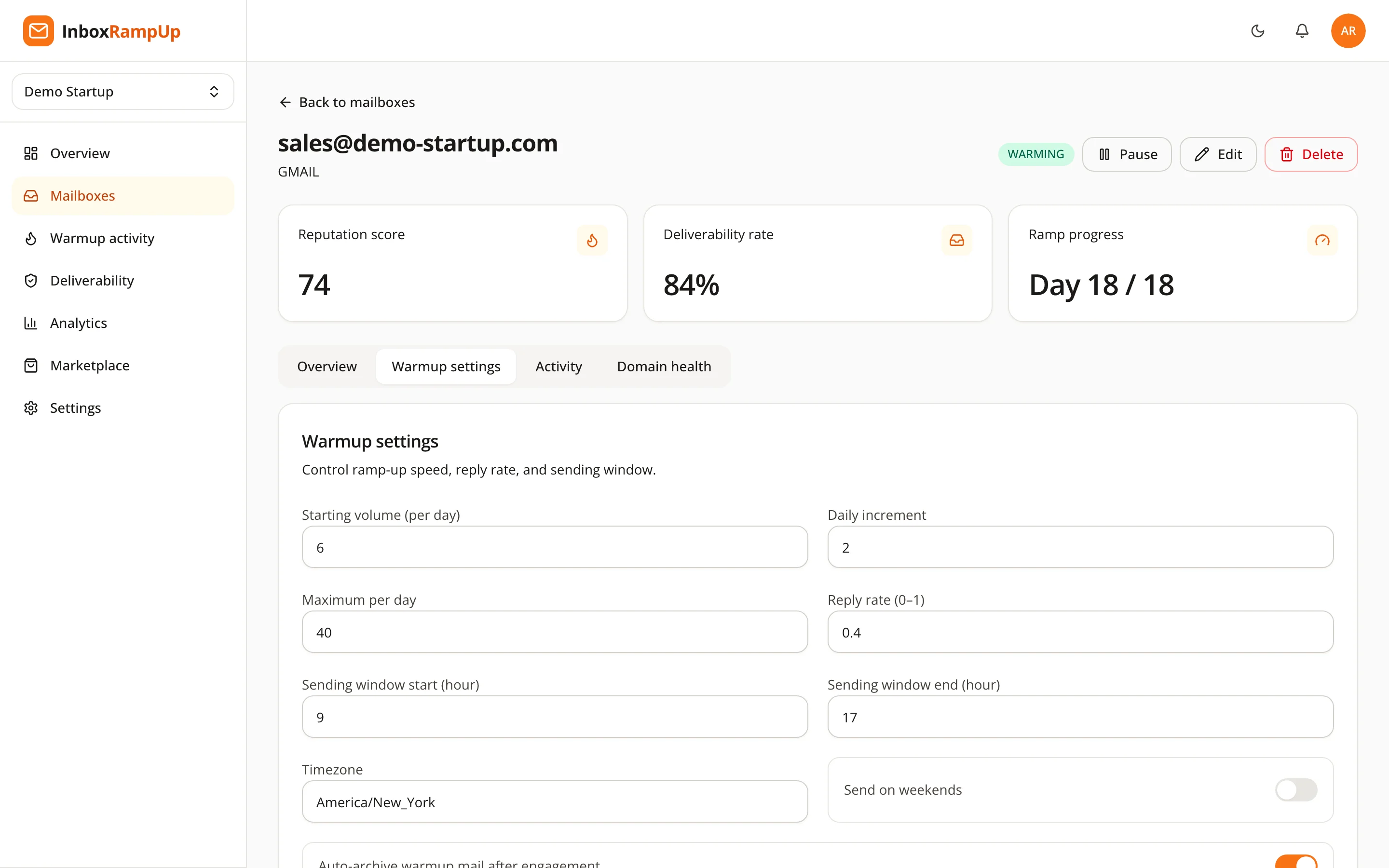
Warmup builds history and keeps your reputation score and domain health visible, and it does not replace list quality, relevant messages or an easy way to unsubscribe. It also guarantees nothing about where a given message lands.

A short checklist before you raise the volume
- SPF, DKIM and DMARC pass for the sending domain.
- The mailbox has completed a warmup period.
- Bounce rate is low and no spam complaints came in at the last volume.
- Your list contains people with a plausible reason to hear from you.
- Every message has a clear way to opt out.
- You are raising the daily number by a small step, not a jump.
Frequently asked questions
Is there a safe number of cold emails per day per inbox?
No single number is safe for every mailbox. The published provider limit is a hard ceiling, and your safe volume is lower and depends on domain age, warmup history, authentication, complaints and engagement. Start small and raise it gradually.
What is Gmail's daily sending limit?
Google's Workspace documentation lists 2,000 messages per day per user account, with lower caps for mail merge and trial accounts, plus limits on recipients. Google can change these, so check the current page. Staying far below the limit is the safer habit.
Is it better to send from one inbox or many?
Spreading volume across several warmed mailboxes keeps each inbox's pattern small and steady and contains problems. Mailboxes on the same domain still add up for bulk sender rules, so plan volume per domain too.
How long should I warm up before sending cold emails?
There is no fixed duration. Give a new mailbox a period of gradual warmup with engagement before real prospecting, then start cold sends small and increase them while bounces and complaints stay low.
Does a low daily volume guarantee inbox placement?
No. Volume is one signal among many. Authentication, list quality, content, complaints and engagement all affect where a message lands, and nobody can guarantee placement.
Build the volume on solid ground
Start with the free deliverability checker to see how your domain looks today. When you are ready to warm up your mailboxes and follow their reputation and domain health in one place, start a free trial. No credit card is required, and setup takes under two minutes.
- cold email
- email deliverability
- email warmup
- sending limits
- cold email volume