Email Warmup Schedule: How a Ramp-Up Works, Step by Step
· 6 min read

A good email warmup schedule does one thing: it makes a brand-new mailbox look like a sender that grows the way real senders grow, a little more each day, at steady times, with real conversations mixed in. A mailbox that sends a large batch of cold emails on day one looks like a spike. A mailbox that starts small and climbs looks like a business that is getting going.
This guide explains what a ramp-up is, what mailbox providers actually say about pacing, which settings shape a schedule, and how to read the signals while it runs. If you are warming a brand-new domain, start with our guide to warming up a new email domain and come back here for the schedule details.
Why volume should rise slowly
Mailbox providers decide where your mail lands partly from history. A new mailbox has none, so every sudden change stands out. Google's email sender guidelines are direct about this: "Increase sending volume slowly to avoid delivery problems." They add that you should start with low volume to engaged recipients and increase it over time, and that "the more email that you send, the more slowly you should increase sending volume."
The same page warns against spikes: "Avoid introducing sudden volume spikes if you do not have a history of sending large volumes," and notes that "immediately doubling previously sent volumes suddenly could result in rate limiting or reputation drops." It also asks senders to send at a consistent rate and avoid bursts.
Google does not publish a universal schedule, and neither does anyone else who is being honest. The page itself says it gives no specific ramp-up percentage. So a schedule is a judgment call built on those principles: low start, gradual climb, steady rhythm.
The four parts of a warmup schedule
Every ramp-up, whether you run it by hand or with a tool, comes down to the same four decisions.
1. Start volume
How many messages the mailbox sends on day one. Keep it small enough that a few messages are all that anyone could ever notice. The point is to create a pattern, not to deliver anything yet.
2. Daily increase
How much the volume grows each day. Google's help article on top Gmail sender issues mentions that after a deferral, a "common daily increase of 25% to 100%" depends on various factors. That range describes recovery pacing after a rate-limit problem, not a warmup recipe, but it shows how cautious the numbers are when something goes wrong: the safe move is to wait, send below the deferral volume for a day, then climb again.
3. Daily cap
The ceiling the ramp-up stops at. A warmup is not meant to grow forever. Once a mailbox reaches the volume you will actually send per day, the schedule levels off and holds. If you are still deciding what that ceiling should be for cold outreach, read how many cold emails per day you can send per inbox.
4. Sending window and timezone
When during the day the mail goes out. Real people send during working hours in their own timezone, not at 3 a.m. in a datacenter's. A schedule that follows the sender's timezone, with some natural jitter in the exact minute, looks like a person at a desk instead of a cron job.

What a ramp-up looks like in InboxRampUp
InboxRampUp builds the schedule around those same four settings. For each mailbox you can set the start volume, the daily increase, the daily cap, the reply rate, and the sending window with its timezone. The warmup network then sends mail between connected mailboxes on that rising schedule, and the receiving mailboxes open it, mark it read, rescue it from spam when needed, and reply.
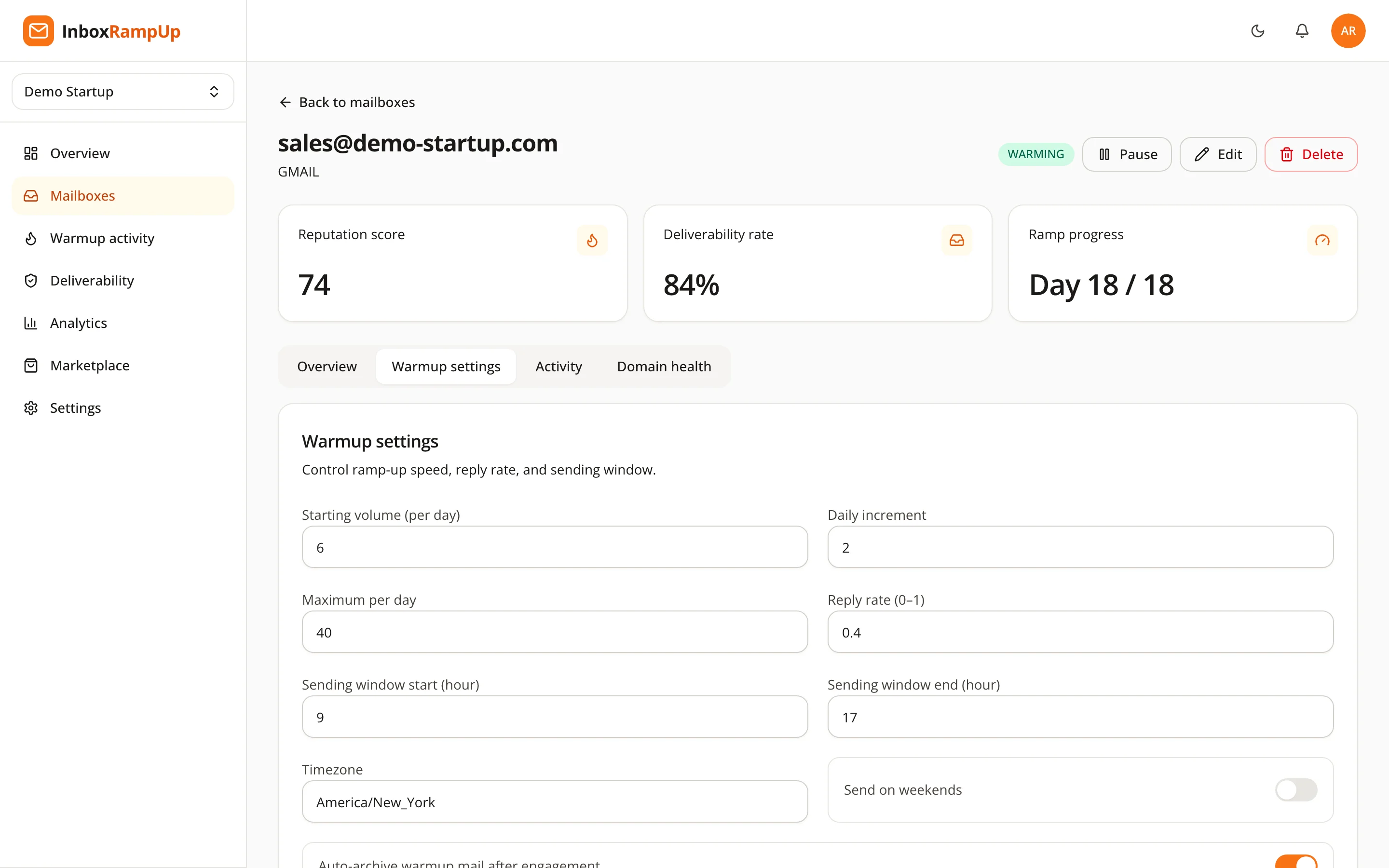
Two details matter here. First, the reply rate: warmup that only sends and never gets a reply is a one-way pattern. Real mailboxes exchange mail in both directions. Second, the cap: you choose where the ramp-up ends, so the schedule matches the volume you plan to send, not a number someone else picked.
How to read the signals while it runs
A schedule is only useful if you can see whether it is working. Three things are worth checking regularly.
Ramp-up progress per mailbox. Your mailbox list should show where each mailbox is in its ramp-up, so you can see which ones are still climbing and which have reached their cap.
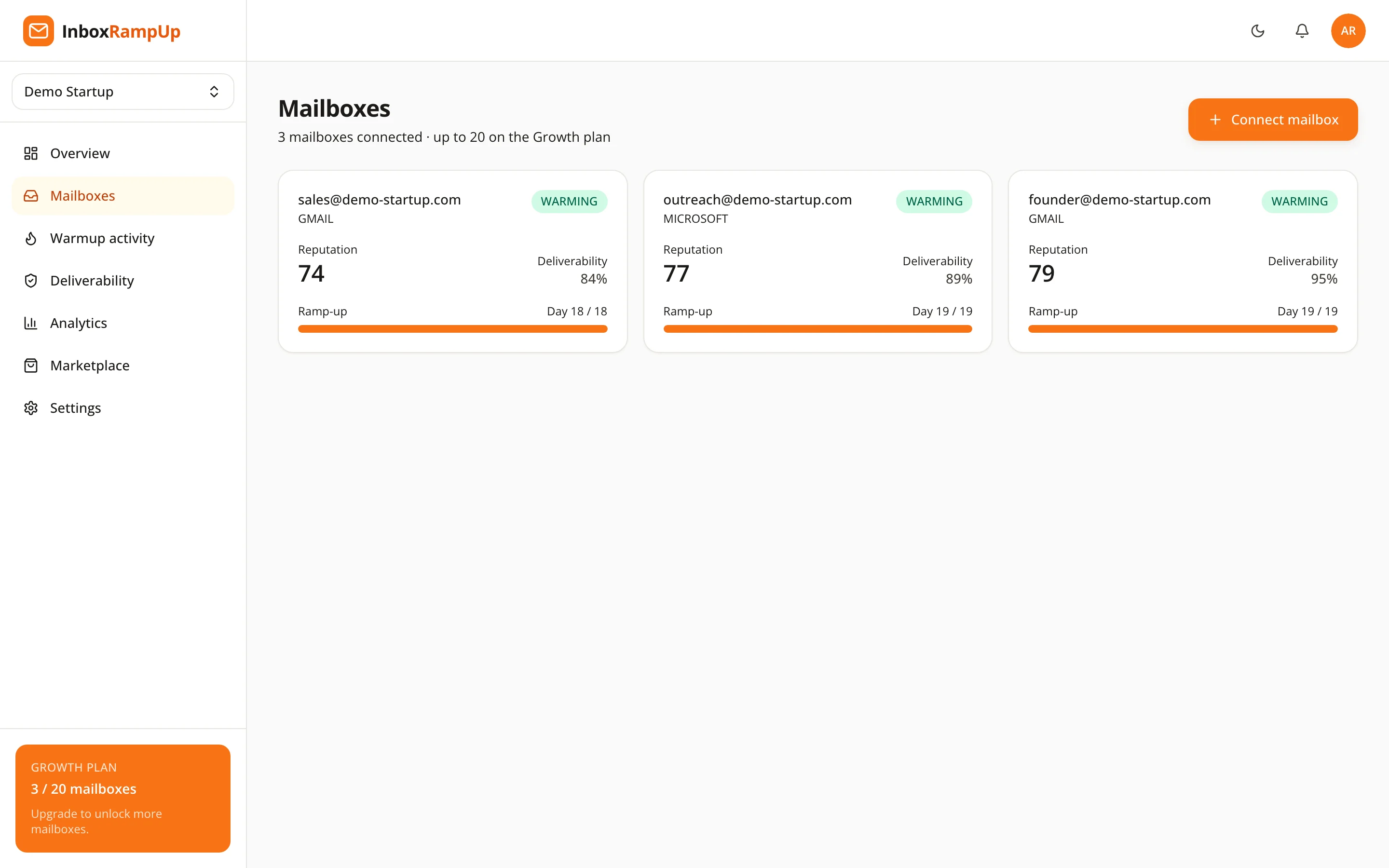
The reputation score. InboxRampUp computes a 0 to 100 score from the real sends and engagement in the warmup network. Treat it as a trend line, not a verdict. A score that climbs with volume is what you want. A score that drops when the volume rises is a signal to hold the schedule where it is.
Bounces and deferrals. Google's guidance is to reduce volume if messages start bouncing or being deferred, then increase slowly again once the error rate drops. The same logic applies to your warmup: if something looks wrong, pause the climb before you push on.
Common mistakes in a warmup schedule
- Starting too high. The mailbox has no history, so there is nothing to absorb a large first day.
- Climbing in bursts. Google asks for a consistent rate. Doubling every day for a week and then stopping for three days is the opposite.
- Skipping the basics. A schedule cannot fix missing authentication. Check SPF, DKIM and DMARC first, as covered in SPF, DKIM and DMARC explained, and confirm the domain is not on a blacklist.
- Stopping the warmup the day the campaign starts. Real campaign mail and warmup mail do different jobs. You can keep the warmup running at its cap alongside real sending, so the mailbox keeps a steady stream of engagement.
- Warming one mailbox and sending from five. Each mailbox builds its own history. Warm every mailbox you plan to use.
A simple way to plan your first two weeks
You do not need a perfect formula. You need a plan you can follow and adjust.
- Decide the daily volume you want each mailbox to reach for real outreach.
- Set the daily cap to that number.
- Start low and choose a daily increase small enough that you could double it and still feel safe.
- Set the sending window to your recipients' working hours or your own, and the right timezone.
- Check the reputation trend and deferral messages every few days, and slow the climb at the first sign of trouble.
For how reputation itself is formed, see what sender reputation is and what actually moves it.
Frequently asked questions
How long should an email warmup schedule last?
There is no official number. Google says only to increase volume slowly and send at a consistent rate. The practical answer is that the schedule should last until the mailbox reaches the daily volume you plan to send and holds it steadily without bounces or deferrals.
Should warmup continue after I start sending campaigns?
You can keep it running at its cap while you send real mail, so the mailbox keeps a steady stream of engagement. It is your call, based on how the mailbox performs.
Does a warmup schedule guarantee inbox placement?
No. Nothing can. Inbox placement depends on authentication, list quality, content, complaint rates and each provider's own systems. A warmup schedule builds the history that gives your legitimate mail a fair start. Google asks senders to keep spam rates reported in Postmaster Tools below 0.10% and to avoid ever reaching 0.30% or higher, which no schedule can do for you.
Can I warm up a domain that already sends mail?
Yes, but be careful. Google also advises ramping up gradually after changes such as new infrastructure, so treat a new sending pattern as something to introduce slowly.
Start with a schedule you can see
If you want to see a ramp-up schedule run on your own mailboxes, start a free trial. No credit card is required, and setup takes under two minutes. If you would rather check your domain's authentication first, try the free deliverability checker, which runs live SPF, DKIM, DMARC, MX and blacklist checks.
- email warmup
- warmup schedule
- sender reputation
- cold email
- deliverability